 Snippets
By CodeStacks.
Snippets aims to be an all-in-one frontend-oriented sandbox for you to experiment with different coding languages — including Python, HTML+CSS, and JavaScript. Language support will increase along the way and you may also find references to this site from the main one (codestacks.net) in terms of testing concepts.
And the best part? You don't even need an account! You can just hit CREATE and you can start coding right away.
The editor is very simple and easy to get used to.
On the top of the page, you will find the navigation bar. Click Create to create a new project. You will find yourself on the New Project page. Choose a name for your project and select a language OR select a template to get started. More templates may be found here.
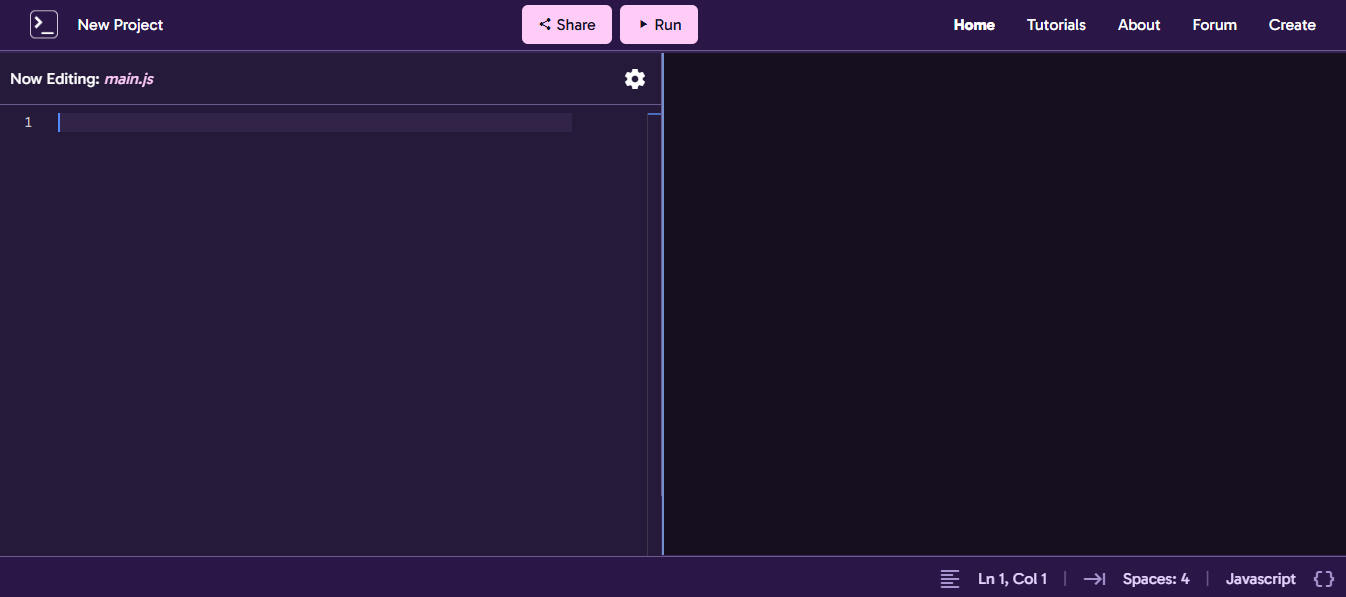
The pane on the left is the editor. The bit on the top is where you choose the file type. Simply change the file extension (e.g.
The right side is your terminal (or preview for HTML). Simply press the RUN button up top and you can instantly preview your code. In the case that it takes long, it might just be the compiler (which will get updated from time-to-time).
In order to share your code with others, simply click the SHARE button up top and a share link will be copied to your device's clipboard. Simply paste the link anywhere and it will always lead to your code snippet — including the project name and language.
Ready to start building your project? Click the New Project button to get started!
Snippets is © Copyright CodeStacks, 2026 to 20XX.
All Rights Reserved.